Plan it, prove it, build the right thing
Plans change. RightBuild makes change easy to communicate.
We live in a world of change. RightBuild brings feature requests, releases and your product roadmap into one place. It tracks every change to your roadmap, gives you clear visibility of what moved, and drafts an AI narrative to help you communicate the why.
Start free on Starter, no card needed. Finish setup to unlock a 14-day trial of Basic, change report included.
The problem
Product managers are buried in admin
Too much of the week goes on keeping things up to date instead of deciding what to build.
Nobody knows what changed or why
Items move between releases and the reason lives in a Slack thread or someone's head.
The roadmap goes stale
Every time a release slips or ships, someone has to move items between Now, Next and Later by hand.
Catching up is a scavenger hunt
After a few days away, you click through boards, releases and requests to work out what needs you.
Requests arrive messy
Vague titles, wrong categories and duplicates all need cleaning before they are useful.
“I can remember the endless spreadsheet shuffle of product management and the hand cranking of roadmap content.”
 Tracy Bishop Oracle ERPM Solution Engineer at Oracle
Change report
Every change, tracked and explained
Capture a version of the roadmap, then compare against it whenever you need to. The change report shows what moved, who moved it and why, ready to share with stakeholders. No more "why did this slip?" emails.
- Every change tracked. Moving an Ask (a feature request) from one release to another asks for a short reason, saved to its history.
- Clear visibility of the movement. Asks that were added, removed or moved to another release are marked on the roadmap, with a count of each.
- An AI narrative for the why. RightBuild drafts a numbered narrative from the reasons and comments your team recorded. Edit it or regenerate it before you share.
- Internal or customer versions. Show external changes only and the internal ones stay hidden.
The change report is included in the Basic and Enterprise plans.

Self-updating roadmap
Add to a release, get three roadmaps
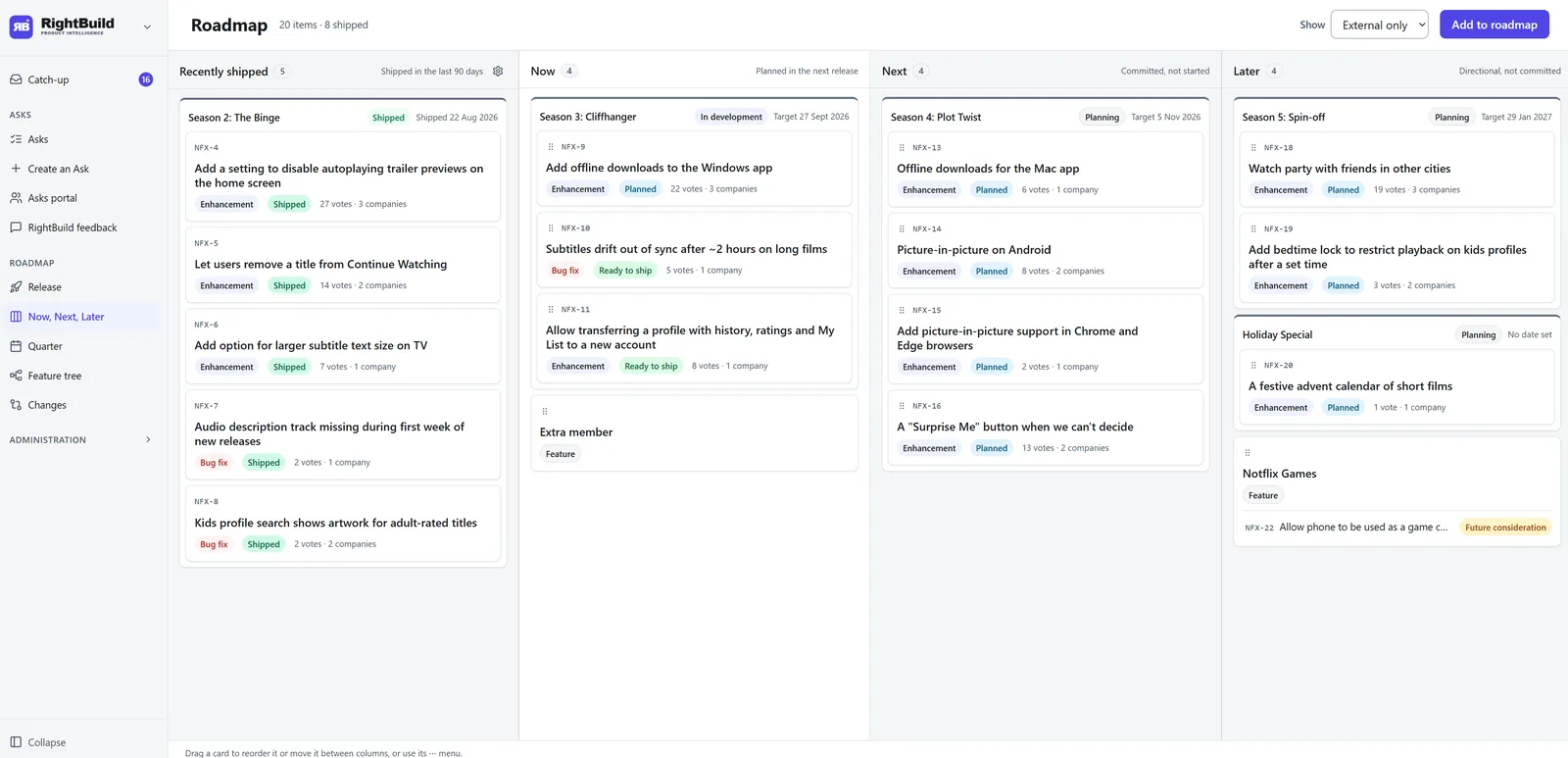
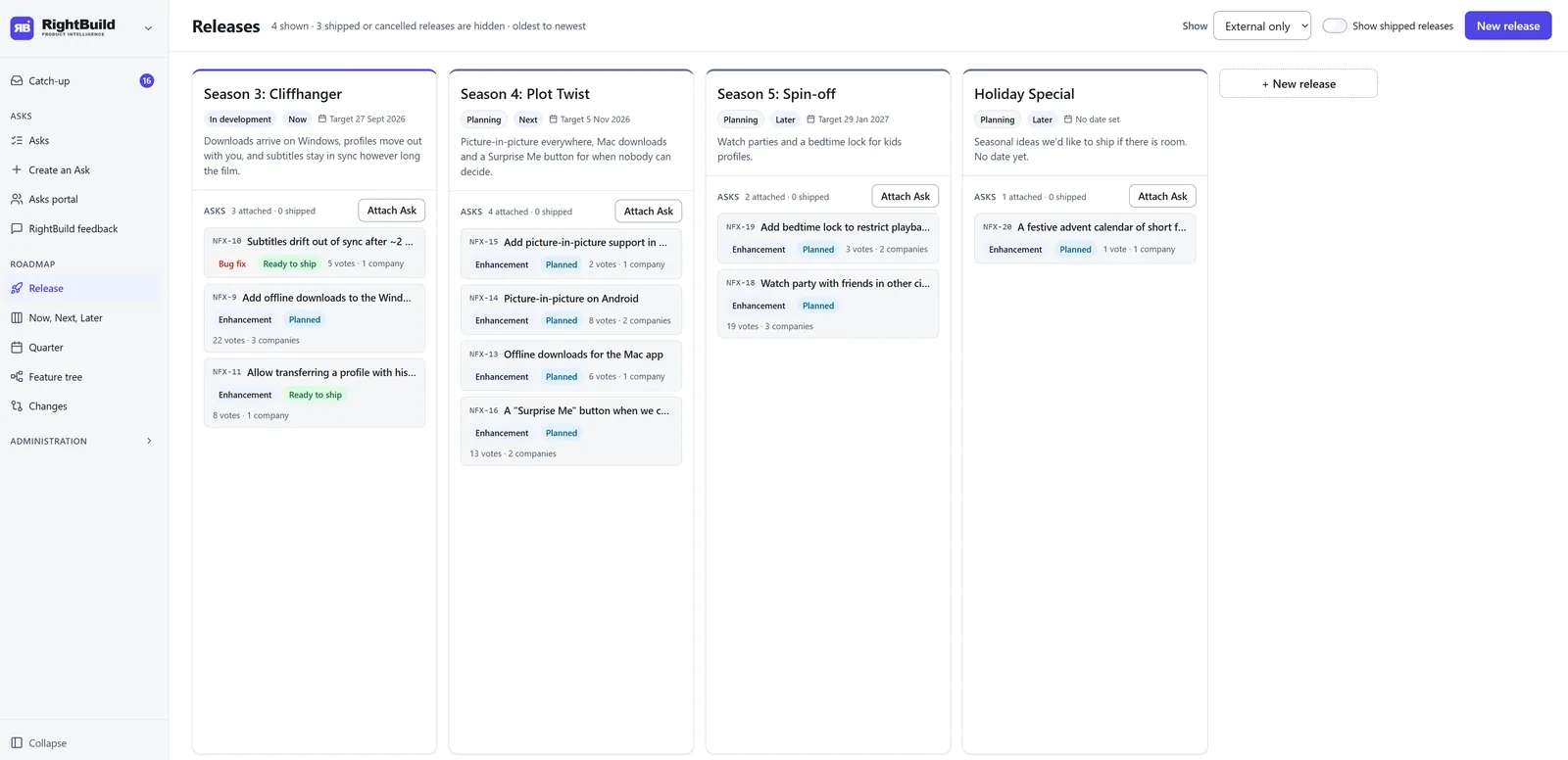
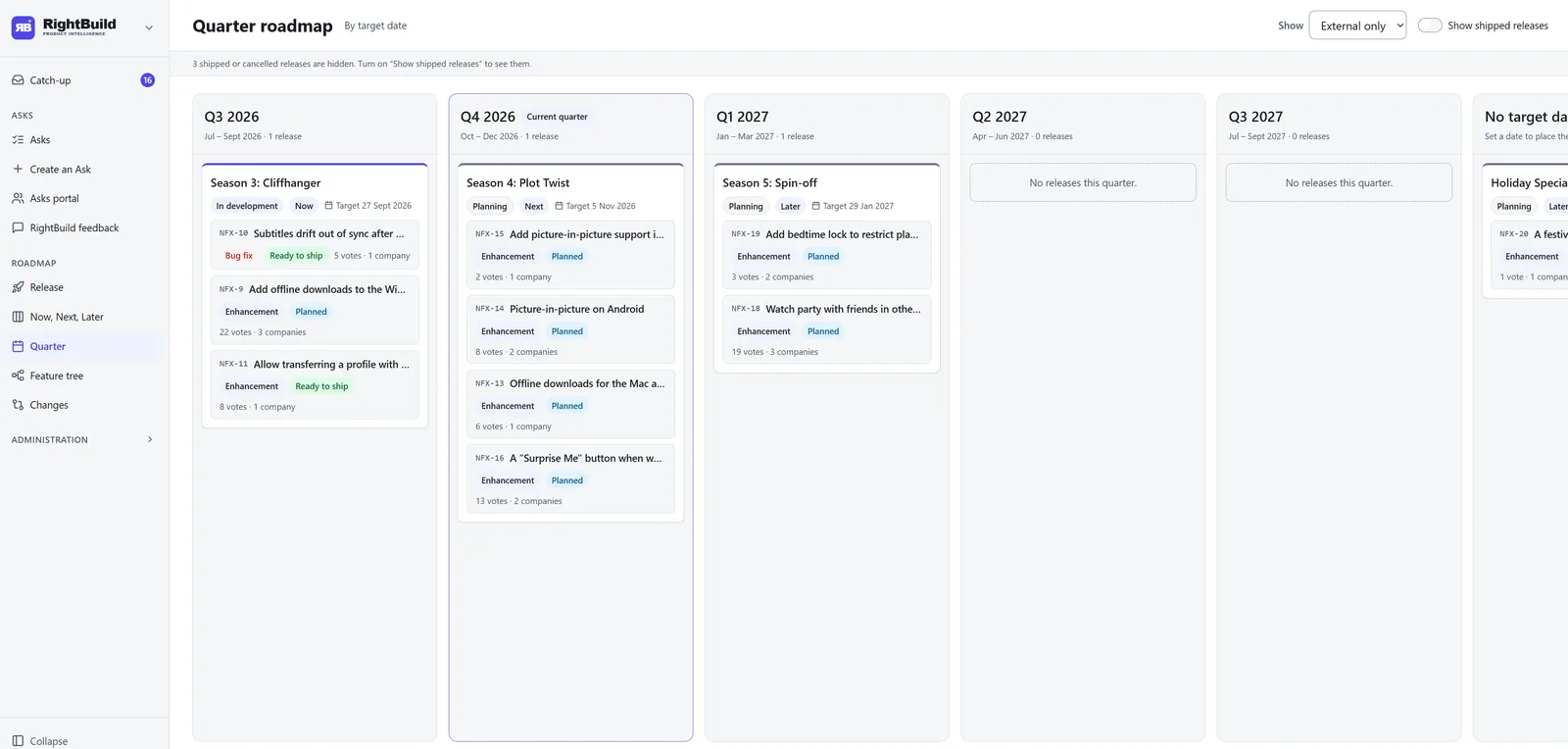
Attach Asks and Features to a release and you get three roadmaps out of the box, each built from the release dates and each filterable for internal or customer use. No more Friday afternoon roadmap tidying.
It moves when reality moves
Ship, reschedule, cancel or add a release and all three roadmaps re-sort themselves. Shipping the Now release pulls the next one forward automatically.
Your calls are respected
If you placed something by hand, RightBuild flags it for review instead of overwriting your call.
One plan, two audiences
Switch any roadmap to external only and internal items stay with your team. Sharing a roadmap with customers is included in Basic and Enterprise.
Catch-up
Know what needs you in one glance
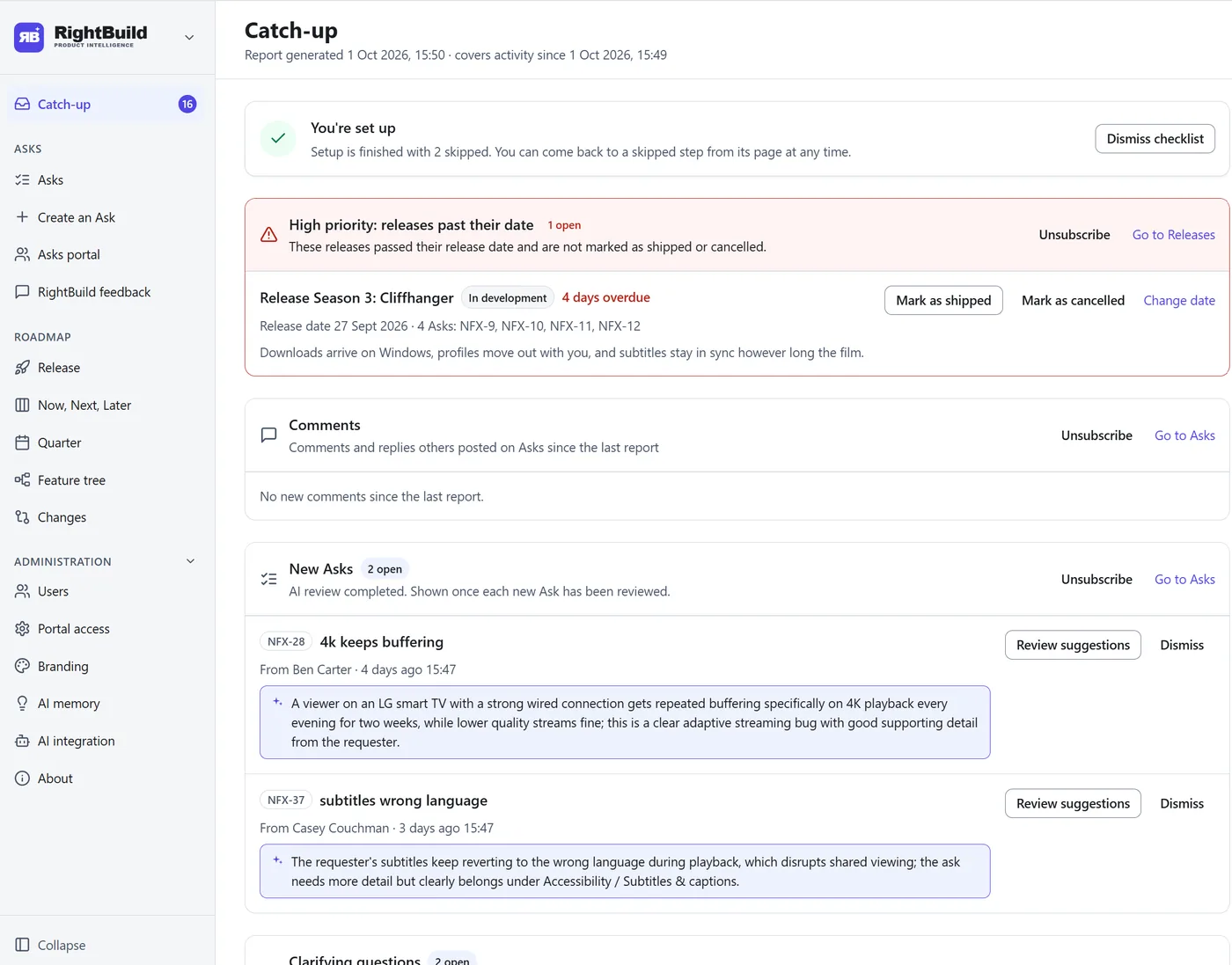
Back from holiday or out of back-to-back meetings? Open RightBuild and see exactly what changed and what needs you, in one list you can work through.
- Actions waiting on you. Releases past their date that have not shipped, Asks the AI has finished reviewing, and new feature suggestions to approve.
- News from your team. Roadmap moves and release note changes other PMs made since your last visit. Your own changes are left out.
- Interactive, not a static report. Act on an item anywhere in RightBuild and it is ticked off in Catch-up automatically.
- Nothing falls through the cracks. Anything left undone carries into the next report. Anything settled drops away.
AI in the workflow
Feature requests arrive ready to use
AI is built into the workflow, not bolted on as a chat box. It cleans and files every request, researches it and maps it to your product. You just approve.
-
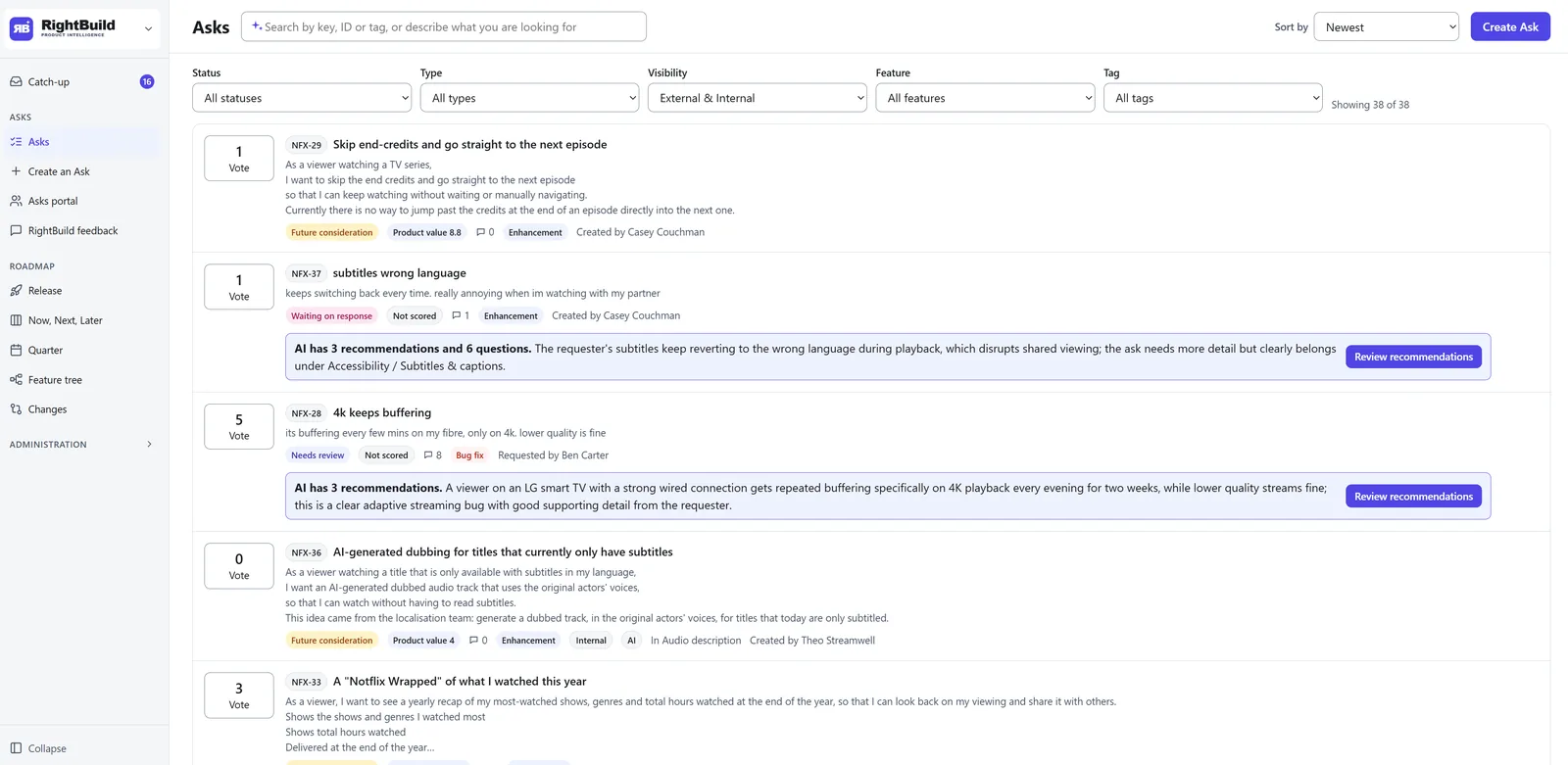
Every request gets an AI review
Customers and teammates raise Asks, the feature requests and feedback RightBuild tracks, often in a hurry. Every new or edited Ask is reviewed by AI, which tells you what it would change before you open it.
-
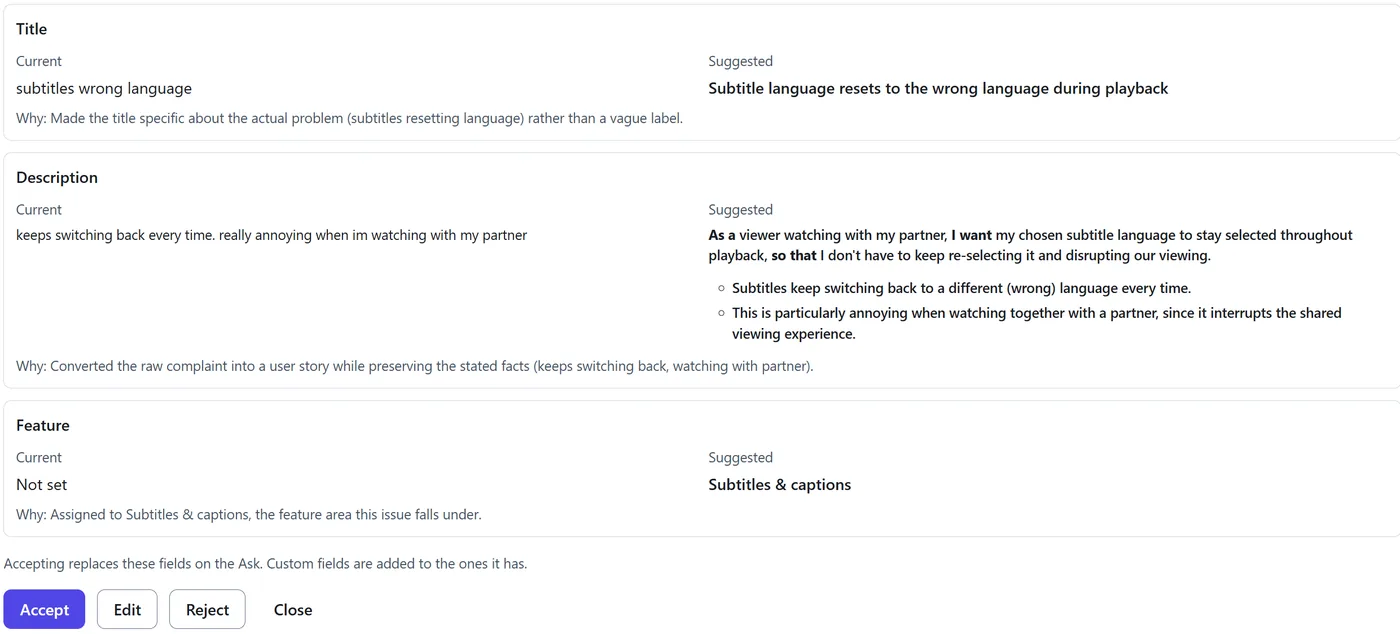
You accept, edit or reject
The AI suggests a clearer title, description, type, tags and where the Ask fits in the product. Each suggestion sits beside the original with the reason for it.
- Current and suggested versions side by side
- Nothing changes until a person accepts it
- Every change is saved to the Ask's history
-
The research is done for you
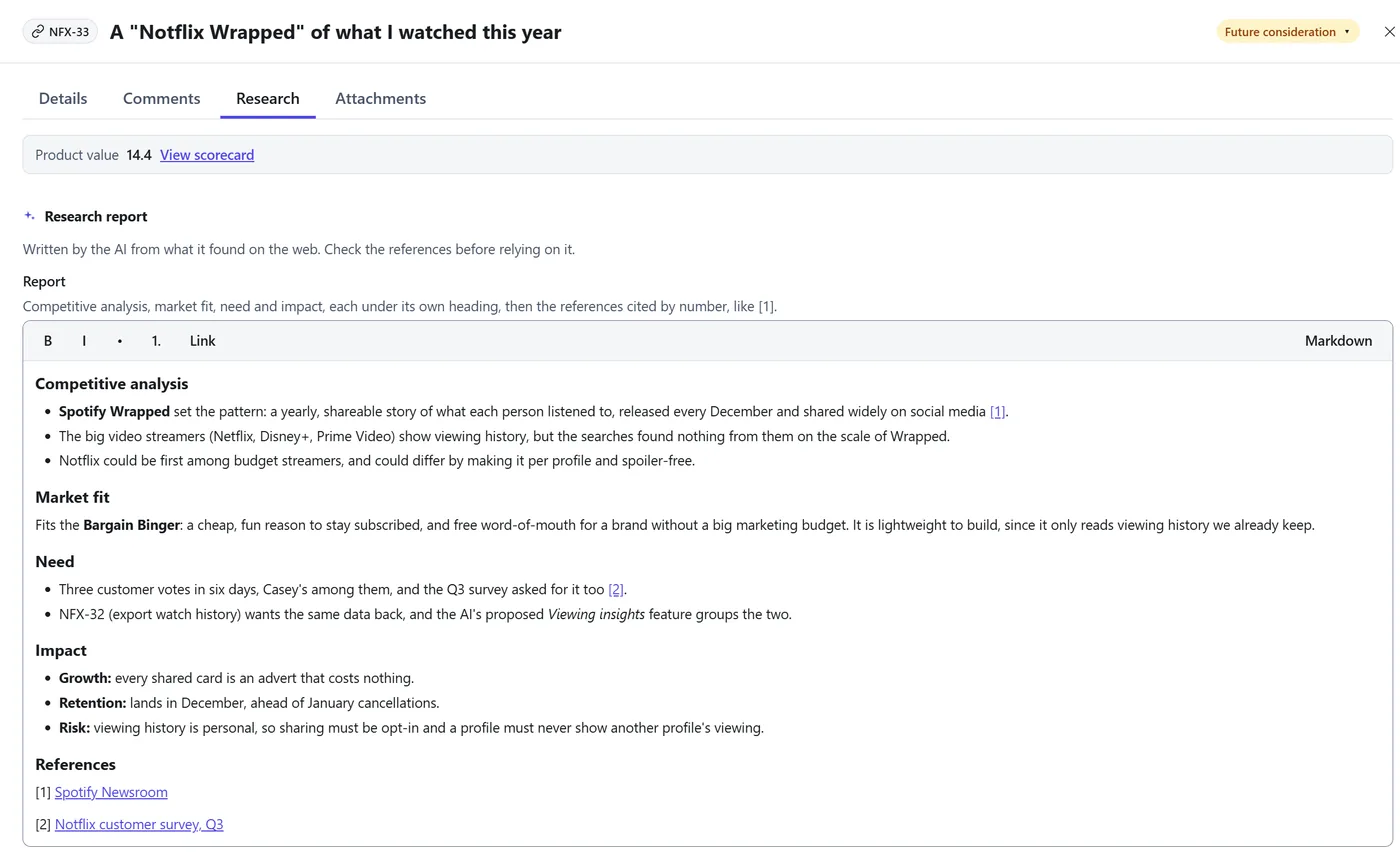
The AI researches an Ask on the web and writes a report on the Ask itself, so you can judge it without opening a dozen tabs.
- Competitive analysis, market fit, need and impact, each under its own heading
- Grounded in your Personas and the votes and comments on the Ask
- Numbered references, so you can check every source
Starter includes 1 market research report a month. Basic and Enterprise include more.
-
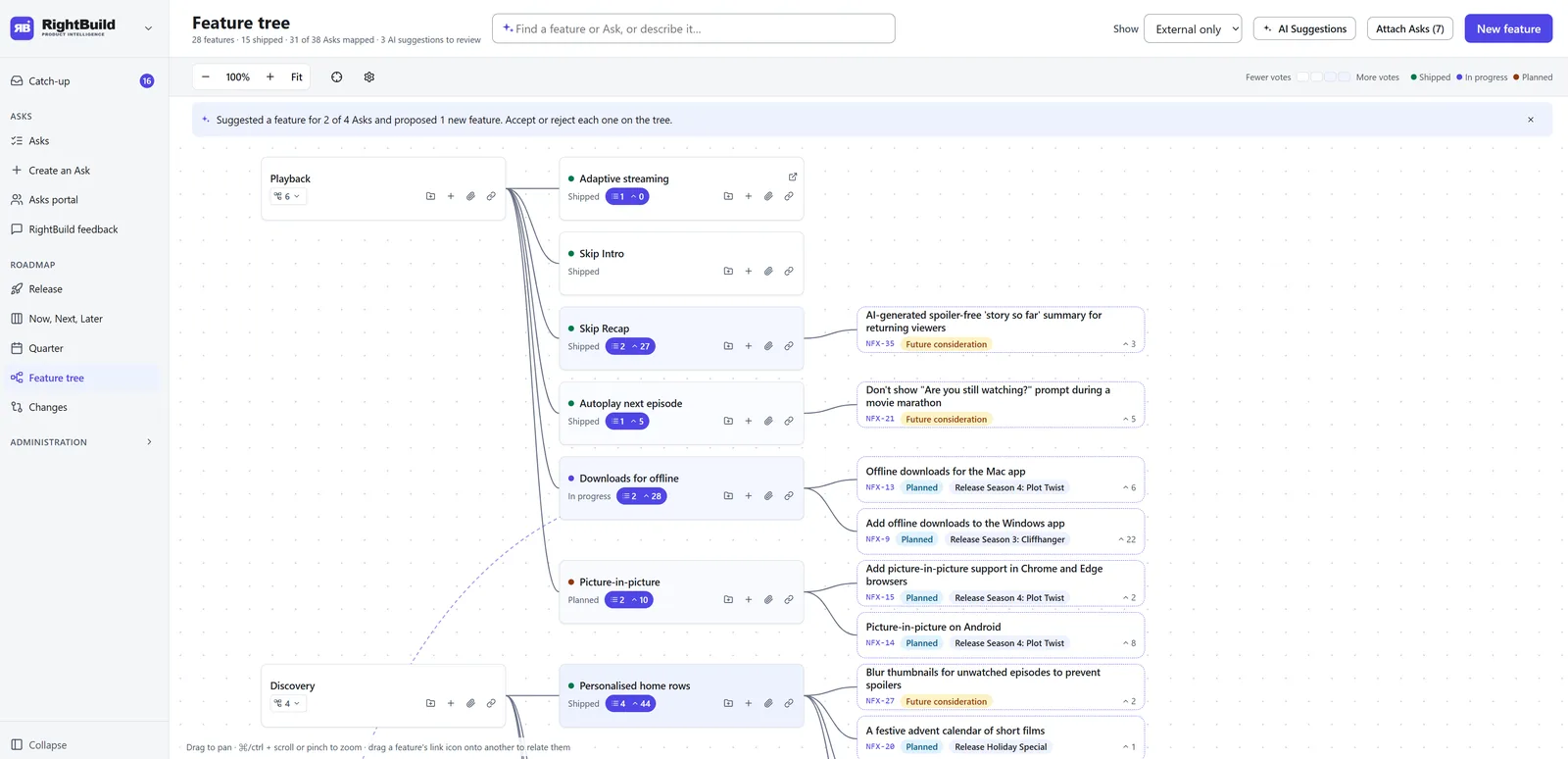
It finds its place in the feature tree
AI looks at Asks not yet linked to a feature and suggests where each belongs, or proposes new features the product is missing. The feature tree shows every request mapped to the product, so demand and gaps are visible at a glance, with no spreadsheet.


Prioritization
Know which feature request is worth the most
Deciding what to build next is the heart of product management. RightBuild weighs each Ask against the other Asks in your backlog and recommends a priority, so the highest value work is easy to see.
- Weighed against the backlog. Each recommendation comes from comparing an Ask with the others waiting beside it, not from judging it alone.
- Grounded in AI memory. The AI remembers your product, your customers and how you score, so its feedback is more accurate.
- A recommendation, not a ruling. You see what the AI would put first. The call stays yours.
The AI memory editor is included in the Basic and Enterprise plans.
What AI memory holds
- Product context and strategy
- Target personas
- Competitive landscape
- Guidelines for evaluating Asks and feature feedback
- Scoring guide
You stay in control
AI suggests. You decide.
Nothing changes without a person's approval, and RightBuild never overwrites a call you made by hand. Every move is recorded with who made it and why.
-
Accept
Take the suggestion as written. The change is applied and recorded.
-
Edit
Keep what's useful, rewrite the rest, then apply your version.
-
Reject
Dismiss it. The Ask stays exactly as it was.
Everything in one place
Less admin, more product management
Customer feedback and feature requests, the feature tree, releases and the roadmap share one workspace, so nothing has to be copied between tools.


-
Smart search
One search box that understands IDs, tags, keywords, typos and plain English, such as "a way to download invoices automatically". Duplicates and related Asks turn up without the hunt.
-
Customer feedback portal and voting
Customers raise Asks, vote on them and comment, so feedback stops arriving scattered across email and calls.
-
AI assistant connection
Raise, update and move Asks, or query the roadmap and its changes, from tools like Claude or Cursor, without opening RightBuild.
How the connection works -
Releases
Releases with target dates and notes, feeding all three roadmaps. No more release plans in separate documents.
-
Personas and strategy
Define who you build for and what you are aiming at, to guide prioritization, instead of leaving strategy on a slide nobody opens.
-
Workspace branding
Each Workspace can use its own logo and accent color, in light or dark mode.
Works where you work
Work with RightBuild from your AI assistant
RightBuild supports MCP. Connect the assistant your team already uses and it can raise, update and move Asks, or query the roadmap and its changes, directly. Build Ask creation into your development process, and generate PowerPoint decks without downloading and formatting anything first.
- Claude Code
- Claude Desktop
- Cursor
- Any MCP-capable assistant
The Starter plan connects read only. Basic and Enterprise assistants can also create, edit and move Asks.
What a connected assistant can do
- List your Workspaces
- Read an Ask
- Create an Ask
- Edit an Ask
- Move an Ask along its lifecycle
- Query the roadmap
- Query what changed on the roadmap

Every cross-functional team
Your whole business is driven from the roadmap
Still running a cross-functional meeting every month to get an update from each function? Internal stakeholders get a roadmap deck that is out of date almost as soon as it lands. RightBuild serves every internal customer from one version of the truth, live.
C-suite
See where the business is heading without waiting for the monthly update.
- The latest changes first. What moved on the roadmap since you last looked, and who moved it.
- The why, not just the what. Every slip comes with its reason and an AI narrative you can read in two minutes.
- Demand you can see. The feature tree shows where customers are asking for more, with evidence behind every request.
- No more stale decks. The roadmap you open is the roadmap the team is working to.
Sales enablement
Keep the field on message as the roadmap moves.
- A talk track for every release. Positioning sits with the roadmap, so it changes when the plan changes.
- Brief the field in minutes. The change report shows what moved and why, ready to share.
- Customer-safe by default. Switch to external only and internal items stay hidden, with no slides to scrub.
- One source to train from. No more chasing the latest version of the roadmap deck.
Sales
Walk into every call with the roadmap as it is today.
- An always up-to-date roadmap with a talk track. Know what to say about every item, not just when it lands.
- A prospect roadmap with a talk track. Show prospects the external view, and keep internal plans internal.
- Know before the customer asks. See what moved since your last call, and why.
- Log a prospect's request in seconds. Raise it as an Ask and follow it all the way to release.
“Pre-sales, sales enablement and marketing all depend on a clear, unified roadmap. Customers buy where the product is going, not just what ships today, so we needed to prepare demos and materials for what was coming, and to know straight away when a feature slipped or a release date moved. Without that, you either miss sales or over-commit.”
 John Brooks Founder @ Enterprise Pre-Sales
Customer success
Give every account a roadmap story that fits where they are.
- Customer-specific release notes. Build a page that shows the changes between the version a customer is on and the latest.
- Upgrade conversations made easy. Show exactly what a customer gains by moving up.
- See where every request stands. Check the status of the Asks your customers raised, and the release each one is planned for.
- Roadmap ready for every QBR. Share the live, external roadmap instead of building another deck.
Support
Answer "is this coming?" without escalating to product.
- Status at a glance. Every Ask shows its status and the release it is planned for.
- Tickets become Asks. Forward an email and it lands as an Ask, with duplicates spotted for you.
- Fewer chase-ups. Customers follow their requests in the portal and see when they ship.
- Release notes to hand. Know what changed in each release before the tickets arrive.
Marketing
Plan launches around dates you can trust.
- See what is landing Now and Next. Plan campaigns from the live roadmap, not last month's slide.
- Know when a date moves. The change report flags slips early, with the reason, so launches move with them.
- Release notes as raw material. Start launch content from what actually shipped.
- The same personas as product. Message to the people the features were built for.
Engineering
Know the what and the why, so you can focus on the how.
- Clear problems to solve. Every roadmap item links back to the Asks and customers behind it.
- Priorities that hold. See what is Now, Next and Later, and why, so the team builds what matters most.
- Fewer interruptions. Sales, support and success check the roadmap themselves instead of pinging engineers for dates.
- See the impact you ship. Release notes close the loop with the customers who asked.
“Everything starts with delivering real value to the customer. Engineering needs product management to clearly define the ‘what’ and the ‘why’ so they can focus on building the ‘how’.”
 Jeremy White Engineering Manager @ Vantaca | Co-Founder @ OrgSure
Swipe for other teams
How we compare
RightBuild and Aha!
Aha! is a broad product suite. RightBuild is built around one job: keeping the roadmap current and explaining every change, automatically.
| Capability | RightBuild | Aha! |
|---|---|---|
| Where RightBuild wins | ||
| Automated change reportWhat moved, who moved it and why, with an AI narrative ready to share | Included | Not included |
| Catch-upOne interactive list of what changed and what needs you, ticked off as you work | Included | Not included |
| Feature treeEvery Ask mapped to the product, so demand and gaps are visible at a glance | Included | Not included |
| AI built into the workflowAI reviews each Ask, suggests where it belongs on the feature tree and explains why the roadmap moved | Included | Not included |
| Both have | ||
| Automated roadmapsNow, Next, Later, by Release and by Quarter views that re-sort themselves from release dates | Included | Included |
| Jira integration | Included | Included |
| Single sign-on (SSO) | Included | Included |
| Where Aha! goes further | ||
| Built-in development systemAha! Develop for engineering teams. RightBuild connects to the one you already use | Not included | Included |
Aha! is a trademark of Aha! Labs Inc. Comparison based on publicly available information, October 2026.
Pricing
Start free. Upgrade when your team does.
Unlimited members on every plan. Paid plans are priced per Owner, the person who owns and manages a Workspace.
-
Starter
$0
Sign upIncludes:
- Asks, voting, comments and search
- Feature tree, roadmaps, releases and Catch-up
- Public Asks portal, RightBuild branded
- AI review of 25 Asks a month
- 1 market research report a month
- 1 Workspace and 1 Owner
- Unlimited members
-
Recommended
Basic
$39per Owner per month
Billed annually, or $45 month to month
Sign upEverything in Starter, plus:
- Change report and shared roadmaps
- AI review of 30 Asks a month per Owner
- 10 market research reports a month per Owner
- Duplicate detection and clarification questions
- Private portal, inbound email and your own branding
- Full MCP access for AI assistants
- 3 Workspaces, add as many Owners as you need
-
Enterprise
Custom
Contact salesEverything in Basic, plus:
- Unlimited Workspaces, AI review and market research
- Asks Portal embedding and your own domain (CNAME)
- Custom fields, tabs and lists of values
- Federated SSO (SAML/OIDC) and SCIM provisioning
- Data region selection and audit log
- Invoice/PO billing on an annual contract
- Priority support with SLA
- Account management
Compare plans
| Feature | Starter | Basic | Enterprise |
|---|---|---|---|
| Core workflow | |||
| Asks, voting, comments, search | Included | Included | Included |
| Feature tree | Included | Included | Included |
| Roadmap board and Quarter roadmap | Included | Included | Included |
| Catch-up | Included | Included | Included |
| Releases board | Included | Included | Included |
| Change report | Not included | Included | Included |
| Shared (external) roadmaps | Not included | Included | Included |
| Customer intake | |||
| Asks Portal | Included: RightBuild branded, public only | Included | Included |
| Portal access settings (private, invite-only) | Not included | Included | Included |
| Embed the Asks Portal in another site | Not included | Included | Included |
| Asks Portal on your own domain (CNAME) | Not included | Not included | Included |
| Inbound email to ask | Not included | Included | Included |
| Attachments storage | 1 GB | 1.5 GB per owner | Unlimited / custom |
| AI | |||
| AI review of asks | 25 asks/month | 30 asks/month per owner | Unlimited |
| AI memory editor | Included | Included | Included |
| Duplicate detection | Not included | Included | Included |
| Clarification questions (emailed to requesters) | Not included | Included | Included |
| Market research | 1 report/month | 10 reports/month per owner | Unlimited |
| Automatic market research of every Ask | Not included | Not included | Included |
| MCP / AI assistants | Read only | Included | Included |
| Workspace and admin | |||
| Workspace owners | 1 | Priced per owner | Priced per owner, volume pricing |
| Workspaces | 1 | 3 | Unlimited |
| Custom fields, tabs and lists of values | Not included | Included | Included |
| Branding (accent color, logo) | Not included | Included | Included |
| Remove "Powered by RightBuild" | Not included | Included | Included |
| Data region selection | Not included | Not included | Included |
| Audit log | Not included | Not included | Included |
| Commercial | |||
| Billing | Not included | Card, monthly or annual | Invoice/PO, annual contract |
| Authentication | Email sign-in code, Google, GitHub | Email sign-in code, Google, GitHub | Federated SSO (SAML/OIDC) + SCIM provisioning |
| Support | Community / docs | 2 business day response | Priority support with SLA |
FAQ
Questions about RightBuild
What is RightBuild?
RightBuild is product roadmap and feature request software for product managers. Customer feedback, the feature tree, releases and the roadmap share one workspace. It tracks every change to the roadmap and drafts an AI narrative that explains why things moved.
What is an Ask?
An Ask is a feature request or piece of feedback from a customer or teammate. Asks can be voted on and commented on, are reviewed by AI and are mapped to the feature tree and attached to releases.
Who is an Owner, and how is pricing worked out?
An Owner is the person who owns and manages a Workspace. Paid plans are priced per Owner, and every plan includes unlimited members.
What is a member, and how much do they pay?
A member is anyone who creates Asks, comments and votes. Members can be internal or external to your organization, and this controls which Asks they can see. All members are free.
Is there a free plan?
Yes. The Starter plan is free and includes Asks, voting, comments, search, the feature tree, roadmaps, releases, Catch-up, a public Asks portal and AI review of 25 Asks a month and 1 market research report a month, for 1 Workspace and 1 Owner.
How is Basic billed?
Basic is billed by card, either annually or month to month. Enterprise is billed by invoice or PO on an annual contract.
Which AI assistants work with RightBuild?
RightBuild supports MCP, so Claude Code, Claude Desktop, Cursor and any other MCP-capable assistant can connect. The Starter plan connects read only. Basic and Enterprise assistants can also create, edit and move Asks.
Does the AI change anything without asking?
No. AI suggestions are applied only when a person accepts them, and RightBuild never overwrites a call you made by hand. Every change is recorded with who made it and why.
Which emails does RightBuild send, and how do I make sure they arrive?
RightBuild sends email from addresses ending in @mail.rightbuild.io. This includes the authentication codes you use to sign in and questions about your Asks, which you can answer by replying to the email. Add @mail.rightbuild.io to your safe senders list, or ask your IT team to allow the domain, so these emails do not land in spam.
Spend the week on product, not admin
Create a Workspace on the Starter plan and let RightBuild keep the roadmap current while you run the product.
Sign up